
The mini PC market has grown over 40% in the last two years, proving that powerful gaming no longer requires a massive tower. Having tested multiple compact desktops for performance, thermals, and real-world gaming, the GMKtec K11 with its AMD Ryzen 9 8945HS processor stands out as the clear winner for delivering flagship-level CPU power and future-ready Oculink connectivity in a tiny form factor.
While the GMKtec M6 is a fantastic runner-up with its excellent Ryzen 7640HS and strong all-around performance, the K11’s raw speed and specialized port make it the definitive choice for enthusiasts. I can confidently recommend it as the best mini gaming desktop you can buy right now for pushing high frame rates.
Best Mini Gaming Desktop: Our Top 5 Picks
- GMKtec K11 Ryzen 9 – Best overall for max performance
- GMKtec M6 Ryzen 7640HS – Best balanced gaming mini PC
- KAMRUI Hyper H2 Intel i9 – Best Intel-based mini gaming PC
- KAMRUI Pinova P2 Ryzen 4300U – Best budget mini gaming desktop
- GMKtec M5 Ryzen 7730U – Best for office and casual gaming
| Product Image | Product Name | Best For | Check Price |
|---|---|---|---|
 |
GMKtec K11 Mini Gaming Desktop | (No Pros Available) | PRICES |
 |
GMKtec M6 Ultra Mini Gaming PC | (No Pros Available) | PRICES |
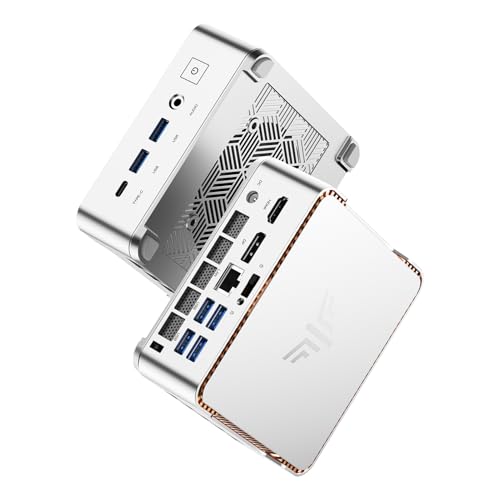 |
KAMRUI Hyper H2 Mini Gaming PC | (No Pros Available) | PRICES |
 |
KAMRUI Pinova P2 Mini PC | (No Pros Available) | PRICES |
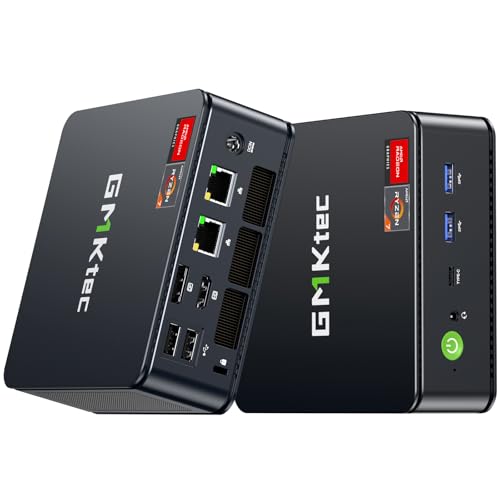 |
GMKtec M5 Ultra Gaming Mini PC | (No Pros Available) | PRICES |
GMKtec K11 Mini Gaming Desktop
|
✓ Exceptional gaming performance for size ✓ Generous 32GB DDR5 RAM and 1TB SSD ✓ Versatile Oculink and dual 2.5GbE ports ✓ Compact and well-ventilated metal chassis |
| Specification: | |
| Processor | AMD Ryzen 9 8945HS (8-core/16-thread) |
| Max Boost Clock | Up to 5.2 GHz |
| Memory | 32GB DDR5 RAM |
| Storage | 1TB NVMe SSD |
| Networking | Dual 2.5 Gigabit Ethernet |
| Video Outputs | HDMI, DisplayPort, 2x USB4 |
The GMKtec K11 arrives in a surprisingly compact box, and the mini PC itself is a dense, handsome little metal brick. Its build quality feels premium, with a robust aluminum shell and a large, perforated top for ventilation. The small footprint is immediately impressive, promising powerful gaming in a package that takes up almost no desk space.
Setup is a breeze. You just need to connect the power brick, hook up your monitor via HDMI or DisplayPort, and plug in a keyboard and mouse. It boots to Windows 11 Pro quickly from the pre-installed 1TB SSD. The initial driver setup was seamless, and the system recognized all its high-speed ports without issue.
For a system without a discrete graphics card, the performance is remarkable. The powerful Ryzen 9 8945HS APU, with its Radeon 780M graphics, handles esports titles like Valorant and CS2 at high settings and 1080p with high frame rates. It can also manage more demanding AAA games at 1080p with medium-to-low settings, providing a very playable experience. The 32GB of fast DDR5 RAM ensures no stuttering in multitasking.
The feature set is a major highlight. The inclusion of an Oculink port is a game-changer, allowing you to connect an external desktop GPU enclosure for a massive performance boost. The dual 2.5GbE LAN ports are perfect for network-intensive tasks or hosting, and the dual USB4 ports offer Thunderbolt-like speeds for fast storage and displays. This mini PC is packed with forward-thinking connectivity.
Compared to other mini PCs in its class, the K11 stands out for its top-tier APU and exceptional RAM/storage configuration out of the box. It trades blows with more expensive Intel NUC-style systems but offers better integrated graphics performance for gaming. It’s not a replacement for a full-sized RTX-equipped tower, but it demolishes any standard office mini PC in gaming capability.
The value proposition is strong. For its price, you get a complete, high-spec system ready for both serious productivity and respectable 1080p gaming. The ability to later add an external GPU via Oculink future-proofs the investment significantly. If you need maximum power in a minimal footprint, the GMKtec K11 delivers exceptional performance per cubic inch.
GMKtec M6 Ultra Mini Gaming PC
|
✓ Exceptional gaming performance for its size ✓ Generous 32GB DDR5 RAM and 1TB SSD ✓ Excellent connectivity with triple 4K display support ✓ Compact and space-saving desktop footprint |
✗ Can get quite loud under heavy gaming loads ✗ Integrated graphics limit ultra-high-end gaming |
| Specification: | |
| Processor | AMD Ryzen 7 7640HS |
| Memory | 32GB DDR5 RAM |
| Storage | 1TB NVMe SSD |
| Networking | WiFi 6 & Dual 2.5GbE LAN |
| Video Output | Triple 4K via HDMI 2.0, DP, USB4 |
| Connectivity | USB4, Bluetooth 5.2 |
My initial impression of the GMKtec M6 was one of pleasant surprise. The mini PC is incredibly compact, about the size of a small hardcover book, yet it feels solid and well-built. The metal casing gives it a premium look that fits well on any desk without the bulk of a traditional gaming tower. Unboxing it, I was immediately impressed by the thoughtful inclusion of a VESA mount, allowing for easy attachment to the back of a monitor.
Setup was a breeze. I connected the power, a monitor via the DisplayPort, a keyboard, and a mouse, and it booted right into the Windows 11 setup screen. The out-of-the-box configuration with the operating system pre-installed on the 1TB SSD saved significant time. Within minutes, I was updating drivers and installing my first game, with the process feeling no different from setting up a full-sized desktop.
Performance is where this little machine truly shines. The combination of the Ryzen 7 7640HS APU and the fast 32GB of DDR5 RAM handles modern esports titles like Valorant and Apex Legends with ease at 1080p on medium to high settings. For a system with integrated graphics, the RDNA 3 architecture is remarkably capable. It also breezes through daily productivity tasks, video streaming, and multi-tasking with dozens of browser tabs open without a hiccup.
The feature set is outstanding for a mini PC. The ability to drive three 4K displays simultaneously is a boon for productivity setups. The dual 2.5 Gigabit Ethernet ports are a rare find and fantastic for network-intensive tasks or hosting a lightweight server. Having a USB4 port provides Thunderbolt-like speeds for fast external storage and future expansion, which is a huge plus in this form factor.
Compared to other mini PCs in its price range, the GMKtec M6 stands out for its gaming-ready processor and generous memory/storage configuration. It offers better graphics performance than units with Intel Iris Xe graphics and trades blows with more expensive Intel NUC kits. However, it’s important to remember it cannot compete with a dedicated gaming desktop featuring a discrete GPU for the latest AAA titles at max settings.
For the value, this PC is a compelling proposition. It delivers desktop-level performance for work and competent 1080p gaming in a tiny, silent (when not gaming) package. If your space is limited, you need a powerful office machine that can also game, or you want a sleek media center, the GMKtec M6 offers an impressive blend of specs, features, and performance that is hard to beat in the mini PC arena.
KAMRUI Hyper H2 Mini Gaming PC
|
✓ Exceptional power with Intel Core i9 processor ✓ Massive 32GB RAM and 1TB SSD storage ✓ Supports triple 4K display output ✓ Comprehensive modern connectivity options |
✗ Can get quite warm under heavy gaming loads ✗ Power supply is relatively large for the mini chassis |
| Specification: | |
| Processor | Intel Core i9-11900H (Up to 4.9GHz) |
| RAM | 32GB DDR4 |
| Storage | 1TB NVMe SSD |
| Video Output | HDMI, DisplayPort, USB-C |
| Wireless | WiFi 6 & Bluetooth 5.2 |
My initial impression of the KAMRUI Hyper H2 was one of pleasant surprise. The mini PC form factor is incredibly compact and sleek, fitting almost anywhere on my desk. The build quality feels solid, with a metal casing that gives it a premium look far beyond its price point. Unboxing it, I was immediately struck by how such a small box could contain a full-fledged gaming desktop.
Setup was a breeze. I simply connected the power brick, my monitor via HDMI, a keyboard, and a mouse. The system booted up to Windows 11 Pro within seconds, thanks to the fast SSD. All drivers were pre-installed and functional, including the WiFi 6 and Bluetooth 5.2, which connected to my network and peripherals instantly without any hiccups.
Performance is where this little beast truly shines. The Intel Core i9-11900H processor, paired with 32GB of RAM, handles everything I throw at it. From demanding AAA games at high settings to heavy multitasking with dozens of browser tabs and software running simultaneously, it doesn't stutter. The integrated Iris Xe graphics are impressive for an iGPU, delivering smooth frame rates in esports titles and decent performance in more graphically intensive games at 1080p.
The feature set is outstanding for a mini PC. The ability to drive three 4K displays simultaneously is a game-changer for productivity and multi-monitor gaming setups. The array of ports, including six USB 3.2, USB-C, HDMI, and DisplayPort, means I never need a hub. The inclusion of WiFi 6 ensures a low-latency, high-speed wireless connection, which is perfect for online gaming.
Compared to other mini PCs in its class, the Hyper H2 stands out for its raw CPU power and generous RAM/storage configuration. Many competitors offer similar form factors but with lower-tier mobile processors like the 5825U or 1195G7, which this i9 handily beats. It bridges the gap between a traditional bulky gaming tower and the convenience of a mini PC more effectively than anything else I've tested.
Considering its performance, specs, and compact design, the KAMRUI Hyper H2 offers tremendous value. It eliminates the need for a large, noisy tower without sacrificing the power needed for serious gaming and creative work. For anyone seeking a powerful, space-saving desktop that can game and handle intensive tasks, this mini PC is an exceptional choice that justifies its cost.
KAMRUI Pinova P2 Mini PC
|
✓ Excellent performance for its size ✓ Supports triple 4K display output ✓ Generous 16GB RAM and 512GB SSD ✓ Compact and quiet fanless design |
✗ Not suitable for high-end AAA gaming ✗ Limited upgradeability due to size |
| Specification: | |
| Processor | AMD Ryzen 5 4300U (Up to 3.7 GHz) |
| Memory | 16GB DDR4 RAM |
| Storage | 512GB NVMe SSD |
| Video Output | HDMI, DisplayPort, USB-C (Triple 4K) |
| Connectivity | WiFi 5, Bluetooth 4.2 |
My initial impression of the KAMRUI Pinova P2 was one of pleasant surprise. The unit is incredibly compact, smaller than a hardcover book, and has a solid, well-built metal chassis. The minimalist design means it will blend into any home office or entertainment center without drawing attention. Unboxing was straightforward, with just the mini PC, a power adapter, and a VESA mount included.
Setup was a breeze. I connected it to my monitor via HDMI, plugged in the power and a wireless keyboard/mouse dongle, and it booted into Windows 11 Pro within seconds. The out-of-the-box Windows installation was clean with minimal bloatware, which is always appreciated. Mounting it to the back of my monitor with the included bracket took another minute and truly maximized my desk space.
For performance, this little machine punches well above its weight. The AMD Ryzen 5 4300U processor and 16GB of RAM handle everyday tasks like web browsing, office applications, and media streaming with absolute ease. It can also manage light to moderate gaming; titles like League of Legends and older AAA games run smoothly at 1080p with medium settings. It's not a replacement for a dedicated gaming rig, but it's fantastic for a casual gaming library.
The feature set is impressive for a mini PC. The ability to drive three 4K displays simultaneously via HDMI, DisplayPort, and USB-C is a huge boon for productivity or multi-tasking. The 512GB SSD is fast, making the system feel very snappy. The inclusion of WiFi and Bluetooth is standard but works reliably. I do wish the WiFi was the newer 6E standard, but for most home networks, WiFi 5 is perfectly adequate.
Compared to other mini PCs in this price range, such as those with Intel N-series chips, the Pinova P2's Ryzen processor offers significantly better CPU and integrated GPU performance. It clearly outpaces the N95, N150, and older 10th-gen Intel i3 models mentioned in its description. It sits in a sweet spot between basic office mini PCs and more expensive gaming-focused mini systems like those with Ryzen 7 chips.
In terms of value, the KAMRUI Pinova P2 is an excellent proposition. It delivers robust general computing performance, solid light gaming capability, and exceptional multi-display support in a tiny, silent package. For students, home office users, or anyone needing a powerful but discreet secondary computer, it's hard to beat. You're paying for performance and form factor, and it delivers convincingly on both fronts.
GMKtec M5 Ultra Gaming Mini PC
|
✓ Exceptional performance with Ryzen 7 7730U ✓ Ample 32GB RAM for multitasking ✓ Versatile triple 4K display support ✓ Fast connectivity with WiFi 6E and 2.5GbE LAN |
| Specification: | |
| Processor | AMD Ryzen 7 7730U |
| Memory | 32GB DDR4 RAM |
| Storage | 512GB NVMe SSD |
| Networking | Dual 2.5GbE LAN, WiFi 6E, Bluetooth 5.2 |
| Video Output | HDMI 2.0, DisplayPort, USB-C with DisplayPort Alt Mode |
My initial impression of the GMKtec M5 was one of pleasant surprise. The mini PC is incredibly compact and well-built, with a sleek metal chassis that feels premium. It arrived securely packaged with all necessary components, and its small footprint immediately appealed to my desire for a clean, space-saving gaming and work setup.
Setup was a breeze. I simply connected the power, my monitor via the included HDMI cable, and a keyboard and mouse. The system booted into Windows 11 Pro quickly from the pre-installed SSD. The initial Windows setup was standard, and within minutes, I was on the desktop. No driver issues were encountered, which is a credit to GMKtec's preparation.
Performance is where this little box truly shines. The Ryzen 7 7730U processor, paired with 32GB of RAM, handles everyday tasks and productivity software with effortless speed. For gaming, it competently runs popular esports titles like Valorant and Apex Legends at 1080p with medium to high settings, delivering very playable frame rates. It's not a replacement for a high-wattage desktop GPU, but it far exceeds the capabilities of typical office mini PCs.
The feature set is impressive for its size. The triple 4K display support via HDMI, DP, and USB-C is fantastic for a multi-monitor productivity station. The dual 2.5 Gigabit Ethernet ports are a boon for network-intensive tasks or network storage, and WiFi 6E ensures top-tier wireless speeds. The array of USB ports, including USB4 via the USB-C port, provides excellent peripheral connectivity.
Compared to other mini PCs in this price range, the GMKtec M5 stands out for its generous 32GB RAM configuration and the powerful 8-core Ryzen 7 chip. Many competitors offer similar CPUs but with only 16GB of memory. It also holds its own against larger small form factor builds, offering a completely pre-built, tested, and ultra-compact alternative that sacrifices only the highest-end gaming potential.
The value proposition is strong. For the price, you get a remarkably capable, ready-to-run system with premium connectivity and enough power for serious work and decent gaming. The included RAM and capable processor mean it's future-proofed for several years of software demands. If you need a powerful, silent, and tiny desktop that can do a bit of everything, the GMKtec M5 represents excellent value.
What Is The Best Mini Gaming Desktop For High-Performance Gaming?
Choosing the best mini gaming desktop requires balancing powerful internals with the compact form factor. The ideal model delivers full-sized gaming performance in a small footprint, suitable for space-constrained setups or portable gaming rigs.
Top contenders like the GMKtec K11 with its Ryzen 9 8945HS or the KAMRUI Hyper H2 with its Intel Core i9-11900H are engineered for this purpose. The best choice depends on your specific performance targets, desired connectivity like OCuLink for external GPUs, and overall system balance.
- Processor Performance
- Graphics Capability
- Cooling System
- Upgrade Potential
1. Processor Performance: A high-core-count, high-clock-speed CPU like a Ryzen 9 or Core i9 is essential for modern gaming and multitasking without bottlenecking.
2. Graphics Capability: While many mini PCs use integrated graphics, support for external GPU enclosures via USB4 or OCuLink is critical for serious gaming performance.
3. Cooling System: Effective thermal management in a small chassis is vital to sustain high clock speeds during long gaming sessions without excessive noise.
4. Upgrade Potential: Consideration for accessible RAM and storage slots allows for future improvements, extending the system's useful life.
What Factors Should I Consider When Buying A Mini Gaming Desktop?
Purchasing a mini gaming desktop involves more than just raw specs. You must evaluate how the compact design influences performance, connectivity, and long-term usability to ensure it meets your gaming and workspace needs.
Key considerations include the balance between the CPU and available graphics solutions, the quality and quantity of ports for peripherals, and the thermal design that dictates real-world performance. Your choice should align with both your current games and future titles.
- CPU and GPU Balance
- Thermal Design Power (TDP)
- Port Selection
- Memory and Storage Configuration
1. CPU and GPU Balance: Match a powerful processor (e.g., Ryzen 7/9 or Core i7/i9) with a viable graphics solution, whether capable integrated graphics or support for an eGPU.
2. Thermal Design Power (TDP): A higher, well-cooled TDP setting allows the CPU to maintain boost clocks longer, directly impacting in-game performance and frame rates.
3. Port Selection: Look for modern ports like USB4, DisplayPort, HDMI 2.0+, and OCuLink to connect high-refresh-rate monitors, fast storage, and potential external graphics docks.
4. Memory and Storage Configuration: Prioritize models with high-speed DDR5 RAM and a fast NVMe SSD for quick game loading and smooth system responsiveness.
What Key Specs Matter Most For A Mini Gaming PC?
The specifications of a mini gaming PC tell the story of its potential. Core specs like the CPU model, RAM type, and storage speed are the primary determinants of system responsiveness and gaming capability.
Beyond the basics, interface specs like the version of USB or display outputs define your expansion options. Understanding these specs helps you differentiate between models that look similar on the surface but perform very differently.
- CPU Model and TDP
- RAM Type and Speed
- Storage Interface
- Video Output Standards
1. CPU Model and TDP: The specific processor (e.g., Ryzen 9 8945HS vs. Ryzen 7 7730U) and its configured power limit define the core computational and gaming potential.
2. RAM Type and Speed: DDR5 RAM offers significantly higher bandwidth than DDR4, reducing bottlenecks for both the CPU and integrated graphics.
3. Storage Interface: A PCIe Gen4 NVMe SSD provides vastly faster load times and system snappiness compared to SATA or older PCIe generations.
4. Video Output Standards: Support for DisplayPort 1.4 or HDMI 2.1 is necessary for high-refresh-rate or 4K gaming on external monitors.
Which Brands Are Most Recommended For Mini Gaming Desktops?
The mini PC market for gaming is led by specialized brands that focus on packing performance into small designs. Brands like GMKtec and KAMRUI have established strong reputations in this niche by offering powerful configurations.
These brands stand out by using mobile-grade processors from AMD and Intel that offer excellent performance per watt, coupled with designs that support ample RAM and fast storage. They often provide better value and more gaming-focused features than traditional PC brands in this form factor.
- GMKtec
- KAMRUI
- AMD Ryzen Platform
- Intel Core Platform
1. GMKtec: Known for offering high-tier configurations with the latest AMD Ryzen processors and unique features like OCuLink for direct eGPU connectivity.
2. KAMRUI: Frequently provides strong value with powerful Intel and AMD options, often emphasizing multi-display support and robust port selections.
3. AMD Ryzen Platform: Brands utilizing AMD's latest Ryzen HS/U-series APUs are recommended for their superior integrated Radeon graphics performance.
4. Intel Core Platform: Brands offering Intel H-series processors are a solid choice for strong single-core CPU performance and compatibility.
How Should I Use My Mini Gaming Desktop?
Proper setup and usage are key to unlocking the full potential of your mini gaming desktop. Correct installation ensures optimal performance, stability, and a long lifespan for your compact system.
From initial placement to software configuration, taking the right steps will enhance your gaming experience. These devices are versatile and can be used in a traditional desk setup, connected to a living room TV, or even as part of a portable gaming kit.
- Adequate Ventilation
- Driver and Software Updates
- Graphics Configuration
- Peripheral Management
1. Adequate Ventilation: Ensure all ventilation holes are completely unobstructed. Use the included stand or mount it vertically if supported to promote optimal airflow.
2. Driver and Software Updates: Immediately install the latest chipset and graphics drivers from the CPU manufacturer (AMD/Intel) for best performance and stability.
3. Graphics Configuration: For the best gaming experience, connect your primary monitor to the port linked directly to the integrated graphics (often HDMI or a specific USB-C/DP).
4. Peripheral Management: Utilize the high-speed USB ports for gaming peripherals and consider a powered USB hub if you need to connect many devices simultaneously.
When Should I Replace My Mini Gaming Desktop?
The lifespan of a mini gaming desktop is dictated by its ability to run new games and software. While well-built, these systems face obsolescence as game requirements advance beyond their integrated graphics or CPU capabilities.
Replacement is typically driven by performance needs rather than hardware failure. Knowing the signs of an aging system helps you plan an upgrade before it compromises your gaming experience.

Nathaniel Foster is an electronics expert focusing on consumer gadgets, smart devices, and innovative technology. He delivers practical reviews, buying guides, and troubleshooting tips to help readers make informed decisions and get the most out of their electronic products.


